CSS 定位机制
CSS 有三种基本的定位机制:普通流、浮动和绝对定位。
position 属性
-
static—— 元素框正常生成。块级元素生成一个矩形框,作为文档流的一部分,行内元素则会创建一个或多个行框,置于其父元素中。
-
relative—— 元素框偏移某个距离。元素仍保持其未定位前的形状,它原本所占的空间仍保留。是相对之前正常位置的变化。
-
absolute—— 元素框从文档流完全删除,并相对于其包含块定位。包含块可能是文档中的另一个元素或者是初始包含块。元素原先在正常文档流中所占的空间会关闭,就好像元素原来不存在一样。元素定位后生成一个块级框,而不论原来它在正常流中生成何种类型的框。
-
fixed—— 元素框的表现类似于将 position 设置为 absolute,不过其包含块是视窗本身。

CSS 浮动——demo
通过 float 属性实现元素的浮动。

使用clear 属性,使图像的左侧和右侧均不允许出现浮动元素:
1
2
3
4
5
img
  {
  float:left;
  clear:both;
  }
1
2
3
4
5
6
7
8
9
10
11
12
13
14
15
16
17
18
19
20
21
22
23
24
25
26
27
28
29
30
31
32
33
34
35
36
37
38
39
40
41
42
43
44
45
46
47
48
49
50
51
52
53
54
55
56
57
58
59
60
61
62
63
64
65
66
67
68
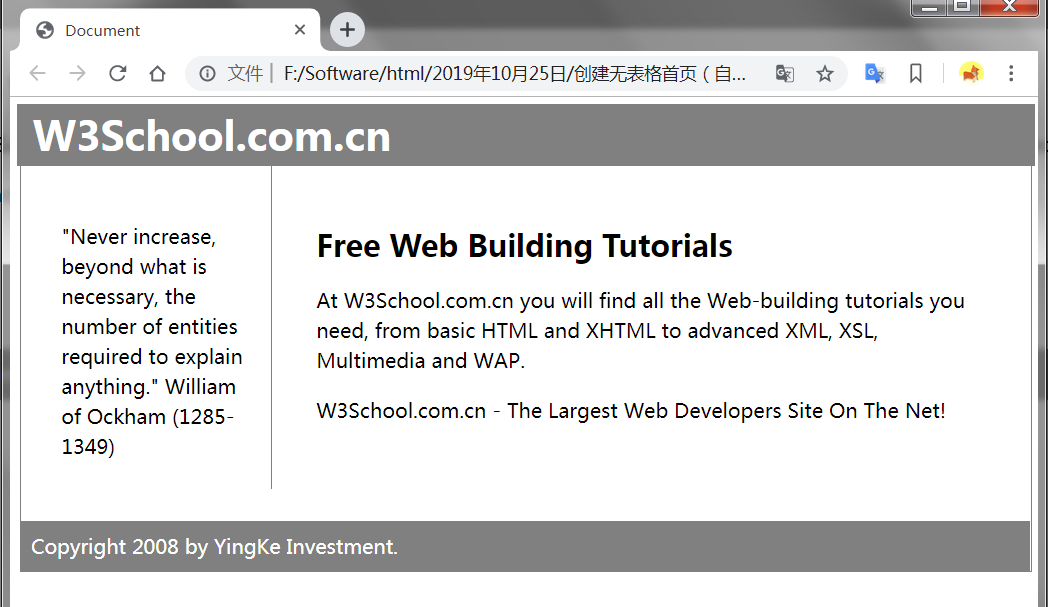
<!DOCTYPE html>
<html lang="en">

<head>
    <meta charset="UTF-8">
    <meta name="viewport" content="width=device-width, initial-scale=1.0">
    <meta http-equiv="X-UA-Compatible" content="ie=edge">
    <title>Document</title>
    <style type="text/css">
        #all {
            border: 1px solid gray;
            line-height: 150%;
            width: 100%;
        }

        .header,
        .footer {
            background-color: gray;
            color: white;
            padding: 0.4em;
            clear: both;
        }

        h1.header {
            margin: -10px;
        }

        p.footer {
            margin: -5px;
        }

        .left {
            float: left;
            width: 150px;
            padding: 2em;
        }

        .txt {
            margin-left: 200px;
            border-left: 1px solid gray;
            padding: 35px;
        }
    </style>
</head>

<body>
    <div id="all">
        <div class="header">
            <h1 class="header">W3School.com.cn</h1>
        </div>
        <div>
            <p class="left">"Never increase, beyond what is necessary, the number of entities required to explain
                anything." William
                of Ockham (1285-1349)</p>
        </div>
        <div class="txt">
            <h2>Free Web Building Tutorials</h2>
            <p>At W3School.com.cn you will find all the Web-building tutorials you need, from basic HTML and XHTML to
                advanced XML, XSL, Multimedia and WAP.</p>
            <p>W3School.com.cn - The Largest Web Developers Site On The Net!</p>
        </div>
        <div class="footer">
            <p class="footer">Copyright 2008 by YingKe Investment.</p>
        </div>
    </div>
</body>

</html>